Continuation from the previous 133 parts, the whole series can be found at https://www.nikoport.com/columnstore/.
In this post we are going to test one of the more promising technologies in SQL Server-based offerings – Vector data types and its relationship with the Columnstore Indexes. The tests I am running right now are executed against SQL Server 2025 RTM, the latest and greatest SQL Server version available to customers. Given that some parts of the SQL Server 2025 were delivered as a Preview Features, the current situation might change in the future for SQL Server 2025 (at least, Half-precision float support should evolve into the fully supported feature, in my opinion). At very least, I do expect reasonably fast evolution of the space on Azure SQL Database & Azure SQL Managed Instance.
Intro
The vector datatype is created to represent vector data, represented in multiple float values, ranging from single-precision (4 bytes) to half-precision (2 bytes, currently in preview). Some of the key applications where vector datatype can be useful are similarity search, NLP, Retrieval-Augmented Generation (RAG), machine learning and geo-spatial analysis, to name a few.
The vector datatype is represented internally in a binary format, but for the developers and final users is represented as a JSON and can be converted (implicitly and explicitly) with the help of (N)Varchar and JSON datatypes.
Besides the new datatype, there is a new type of the index – a Vector Index, or as it officially described in the documentation as an approximate vector index and vector search, allowing create of an approximate index on a Vector column to improve performances of nearest neighbors search. Similar to the half-precision float support for the Vector datatype, Vector Indexes are delivered as a preview feature in SQL Server 2025 RTM. Besides many limitations and requirements, creating a vector index makes table read only. This alone makes Vector Indexes a good relative to the Columnstore Indexes (Nonclustered Columnstore Index) was read only when it was launched in SQL Server 2012.
With that, let’s enable the preview features on our SQL Server database:
ALTER DATABASE SCOPED CONFIGURATION
SET PREVIEW_FEATURES = ON;
Why Columnstore Indexes
With all the info from the introduction, what would take me to test the Vector datatype and the Vector Index on the compatibility with the Columnstore Indexes? Would not Vector datatype and index(es) be self-sufficient in the future ? Why would someone mix the Vector and Columnstore Indexes together?
You see, the type of the application for the similarity search, RAG and Machine Learning are very typical to be run against a Data Warehouse or a Data Mart, meaning there will be a huge need for the integration with the Columnstore Indexes. Not only the datatype integration but the compatibility of the Vector Index to function side by side with the Columnstore Indexes is needed.
For the massive processing, there is nothing better on SQL Server based solutions, than the speed that Batch Mode delivers, hence the expectation is that it must be compatible.
Vector data type and Clustered Columnstore Index
For the basic of the tests, let’s create a simple table (complying with the basic requirements, such as having an integer column with a primary key, for creating Vector Index on it later), containing a [v] column with Vector datatype. After that let’s create a Clustered Columnstore Index on the table, insert some data and then select the data from the table:
DROP TABLE IF EXISTS dbo.vectors;

CREATE TABLE dbo.vectors
(
    id INT PRIMARY KEY NONCLUSTERED,
    v VECTOR(3) NOT NULL
);

CREATE CLUSTERED COLUMNSTORE INDEX CCI_vectors on dbo.vectors;


INSERT INTO dbo.vectors (id, v)
VALUES (1, '[0.1, 2, 30]'),
       (2, '[-100.2, 0.123, 9.876]'),
       (3, JSON_ARRAY(1.0, 2.0, 3.0)); -- Using JSON_ARRAY to create a vector

SELECT *
FROM dbo.vectors;
The above code works well, without any warnings or error messages – meaning that one can use Vector datatype on the tables with the Clustered Columnstore Indexes. But what about sorting the data for the Clustered Columnstore Indexes – the feature that will be described in details in one of the upcoming blog posts (the concept that exists quite long in Azure SQL DW / Synapse / Fabric DW / whatever it will be called).
For this purpose, let’s drop the existing Clustered Columnstore Index and create an ordered Clustered Columnstore Index:
DROP INDEX CCI_vectors on dbo.vectors;

CREATE CLUSTERED COLUMNSTORE INDEX CCI_vectors on dbo.vectors
ORDER (id);
The above batch works fine, allowing us to sort data on our primary key, while including the Vector datatype.
But what about sorting the data on the Vector datatype ? Even though the object (Vector) itself is a multi-dimensional object, even the defined 3 dimensional vector can be sorted on the base of the projection.
DROP INDEX CCI_vectors on dbo.vectors;

CREATE CLUSTERED COLUMNSTORE INDEX CCI_vectors on dbo.vectors
ORDER (v);
Unfortunately, in this case the above batch results in the following error:
Msg 1978, Level 16, State 4, Line 3
Column 'v' in table 'dbo.vectors' is of a type that is invalid for use as a key column in an index or statistics.
I do not have the biggest problem of the initial release does not supporting direct inclusion of the column into the Columnstore Index, nor do I have the biggest of the problems with it not being sorted in the traditional sense of a single-valued column. The error message is not the happiest one (could have been more explicit as we are not forcing the key after index creation – similar to FILLFACTOR), but it is correct, as the specified column is indeed the key.
I am happy with the initial support, there are no reasons for not being able to support the principal structure of the Data Warehousing for the feature that will be heavily used in HTAP & OLAP environments. Speaking of the HTAP, let’s check the status of the Nonclustered Columnstore Indexes.
Vector data type and Nonclustered Columnstore Index
Since SQL Server 2016, we have fully writeable Nonclustered Columnstore Indexes, that have brought so many happiness to the customers needing to speed up massive processing of their data. Creating Nonclustered Columnstore Indexes on the tables with Vector data is essential and I would argue that as with Clustered Columnstore Indexes, it should be supporting inclusion of the Vector columns into the Columnstore Index. Obviously, the expectation is that not including the column into the Nonclustered Columnstore Index should work as well.
Let’s drop the previously created Clustered Columnstore Index and create a new Nonclustered Columnstore Index, including both columns into it – the integer and the Vector datatypes.
DROP INDEX CCI_vectors on dbo.vectors;

CREATE NONCLUSTERED COLUMNSTORE INDEX NCCI_vectors on dbo.vectors (id, v);
This works perfectly and trust me or run the code by yourself excluding the Vector column, but creating Nonclustered Columnstore Index on the table with a Vector column and not including it works fine as well. :)
Sorting Nonclustered Columnstore Indexes works in the same way as with the Clustered Columnstore Indexes – it works as long as we do not explicitly sort on the Vector column. The error message for sorting on the Vector column is the samne as for the Clustered Columnstore Indexes.
Msg 1978, Level 16, State 4, Line 3
Column 'v' in table 'dbo.vectors' is of a type that is invalid for use as a key column in an index or statistics.
Vector data type and In-Memory Columnstore Index
I have a well-documented appreciation for the In-Memory technologies and I will gladly test any new feature against the Hekaton. I understand that it has not proved itself as impactful as a lot of technologists expected it to be, but there are many cases where it can bring an incredible edge to the performance of the server, when nothing else seems to be able to help.
So, let us experiment with the Vector data type by enabling Hekaton on our CCITest database by adding an In-Memory Filegroup:
ALTER DATABASE CCITest
ADD FILEGROUP [File_group_name] CONTAINS MEMORY_OPTIMIZED_DATA;
Now we are ready to create a “morally-equivalent” table by using in-memory technology:
CREATE TABLE dbo.vectors_inmem
(
    id INT PRIMARY KEY NONCLUSTERED,
    v VECTOR(3) NOT NULL -- Uses default base type (`float32`)
)
WITH ( MEMORY_OPTIMIZED = ON , DURABILITY = SCHEMA_AND_DATA);
This statement results in the error message shown below:
Msg 10794, Level 16, State 80, Line 1
The type 'vector(3)' is not supported with memory optimized tables.
Using SCHEMA_ONLY results in the very same error message.
I can’t say that I am shocked by this outcome, especially for a V1 (or should I say v1-preview) feature.
To be frank – I do not believe that Microsoft is going to port Vector datatype to In-Memory, until something dramatically changes with the In-Memory adoption and until the Vector & Vector Index are finalized as features.
Vector Index
Vector Index, together with JSON Index are the latest 2 new types of indexes in SQL Server (2025). The goal of any index is to speedup the lookup of the information within the table and Vector Index is not an exception. Focused on improving nearest neighbors search, Vector Index is served in SQL Server 2025 RTM under “Preview” feature switch. Let’s create the Vector Index by using DiskANN algorithm to navigate quickly for finding the closest match. The algorithm is graph-based and should be efficient for using large sets of vector data without huge amount of resources.
CREATE VECTOR INDEX VIx_vectors
    ON [dbo].[vectors] ([v])
        WITH (METRIC = 'COSINE', TYPE = 'DISKANN');
The first attempt results in an error message, since I have explicitly defined the Primary Key on this table as a Nonclustered one. This was done on purpose with the goal of enabling creation of the Clustered Columnstore Index, but as a result of the message below, it starts looking rather dull for the Clustered Columnstore Indexes, since we cannot have 2 Clustered indexes on the same table:
Msg 42217, Level 16, State 1, Line 2
Table 'dbo.vectors' must have a clustered primary key on a single 4 byte INT column to create a vector index.
The most interesting thing for me is why the requirement of the INT column, and not allowing BIGINT … Not that I every single customer uses tables beyond 2 billion rows, but I have seen more than enough in the wild.
For the sake of the test, I will recreate the table with the Clustered Primary Key, attempting to create Vector Index right away:
DROP TABLE IF EXISTS dbo.vectors;

CREATE TABLE dbo.vectors
(
    id INT PRIMARY KEY CLUSTERED,
    v VECTOR(3) NOT NULL -- Uses default base type (`float32`)
);

CREATE VECTOR INDEX VIx_vectors
    ON [dbo].[vectors] ([v])
        WITH (METRIC = 'COSINE', TYPE = 'DISKANN');
and attempt to create the Clustered Columnstore Index:
CREATE CLUSTERED COLUMNSTORE INDEX CCI_vectors on dbo.vectors;
resulting in an error message, as totally expected:
Msg 10683, Level 16, State 1, Line 1
Cannot create columnstore index because vector index already exists on the table.
We can still try creating Nonclustered Columnstore Index, because nothing should prevent it from being created:
CREATE NONCLUSTERED COLUMNSTORE INDEX CCI_vectors
    on dbo.vectors (id, v);
resulting in a following error message, saying that the Columnstore Indexes are not really compatible with the Vector Indexes:
Msg 10683, Level 16, State 1, Line 1
Cannot create columnstore index because vector index already exists on the table.
There is no reason to attempt to create a Vector Index on the In-Memory Columnstore table, because the underlying Vector datatype is not supported there at all, as per the tests above.
I am a kind of OK with the current of the technology, even with the read only (as per the documentation, the table becomes read only after the Vector Index creation), because as mentioned previously – this is precisely how the Columnstore Indexes appeared in SQL Server 2012. I am quite aware of the ALLOW_STALE_VECTOR_INDEX option that is available on the Azure SQL Database, but it does not change behavior in connection to the Columnstore Indexes
I am VERY NOT OK with the whole “PREVIEW” thing though. And this is as far as I will go on this topic today.
Vector and Batch Mode
Vector Index is positioned very much as a self-sufficient mechanism for customer lookup operations, which will be interesting to find out how it will look in the real world, once people will get those indexes into the production with hundreds and thousands of queries per second and against tables with millions and billions of rows.
Having said that, I am wondering if the Vector datatype and Vector Index are successfully integrated with the Batch Execution Mode in this initial release. There are not many scenarios where massive data processing can be done more effectively outside of the Batch Execution Mode.
Let’s start the simple test by recreating our table with simple Vector column and just 1 float, adding then a Clustered Columnstore Index:
DROP TABLE dbo.vectors;

CREATE TABLE dbo.vectors
(
    id INT PRIMARY KEY NONCLUSTERED,
    v VECTOR(1) NOT NULL
);

CREATE CLUSTERED COLUMNSTORE INDEX CCI_vectors on dbo.vectors;
Now, let’s load 5 million rows into this table:
INSERT INTO dbo.vectors (id, v)
SELECT TOP (5000000)
    ROW_NUMBER() OVER (ORDER BY (SELECT NULL)),
    CAST(JSON_ARRAY(ABS(CHECKSUM(NEWID())) % 1000) as Vector(1))
FROM sys.all_objects a
CROSS JOIN sys.all_objects b;
Now, we should be able to run a couple of aggregations against the table, observing (or not) Batch Execution Mode.
Let’s start with the basics verifying that there are 5 million rows loaded:
SELECT COUNT(id)
    from dbo.vectors;
The query works just fine, presenting the following execution plan:

Now, without doing aggregation and explicitly referring to the Vector column while using a VECTOR_DISTANCE functions reveals working fine:
DECLARE @v VECTOR(1) = '[0.3]'
SELECT top 500 id, VECTOR_DISTANCE('cosine',v,@v)
    from dbo.vectors
with the Batch Execution Mode appearing at the right place at the right time, even though we are filtering just top 500 results:
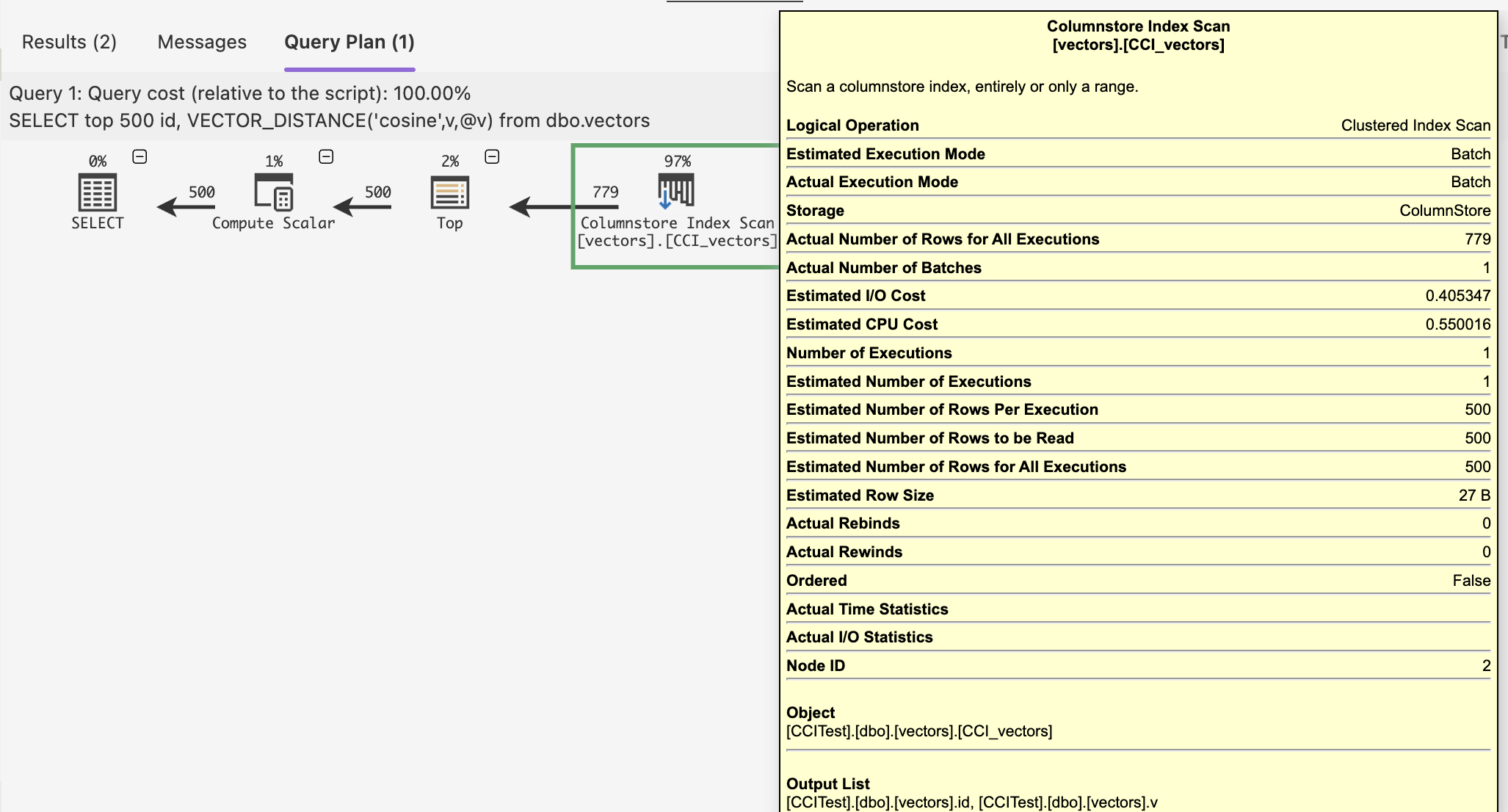
Running an aggregation against the Vector column functions perfectly within the batch mode, even on the tiniest iterator – Compute Scalar.
DECLARE @v VECTOR(1) = '[0.3]'
SELECT AVG(VECTOR_DISTANCE('cosine',v,@v))
    from dbo.vectors

I won’t be diving into the specifics of the Batch Mode here, but the important thing is that it is present and it is compatible with the Vector datatype. This means by default we have a pretty good results.
To be more blunt – I have been impressed so far with the performance and the integration of Vector datatype and the Batch Execution Mode. Working on the smaller sets with the help of the Batch Execution Mode can bring great stability of the performance.
I am excited to look under the hood, one of this days … :)
Bacth Mode on Rowstore and Vectors
Wait a second, but there is a Batch Execution Mode on the Rowstore, introduced officially on SQL Server 2019 – will it work there ?
Let’s test it by dropping the Clustered Columnstore Index and run the last aggregation query.
DROP INDEX CCI_vectors on dbo.vectors;

DECLARE @v VECTOR(1) = '[0.3]'
SELECT AVG(VECTOR_DISTANCE('cosine',v,@v))
    from dbo.vectors
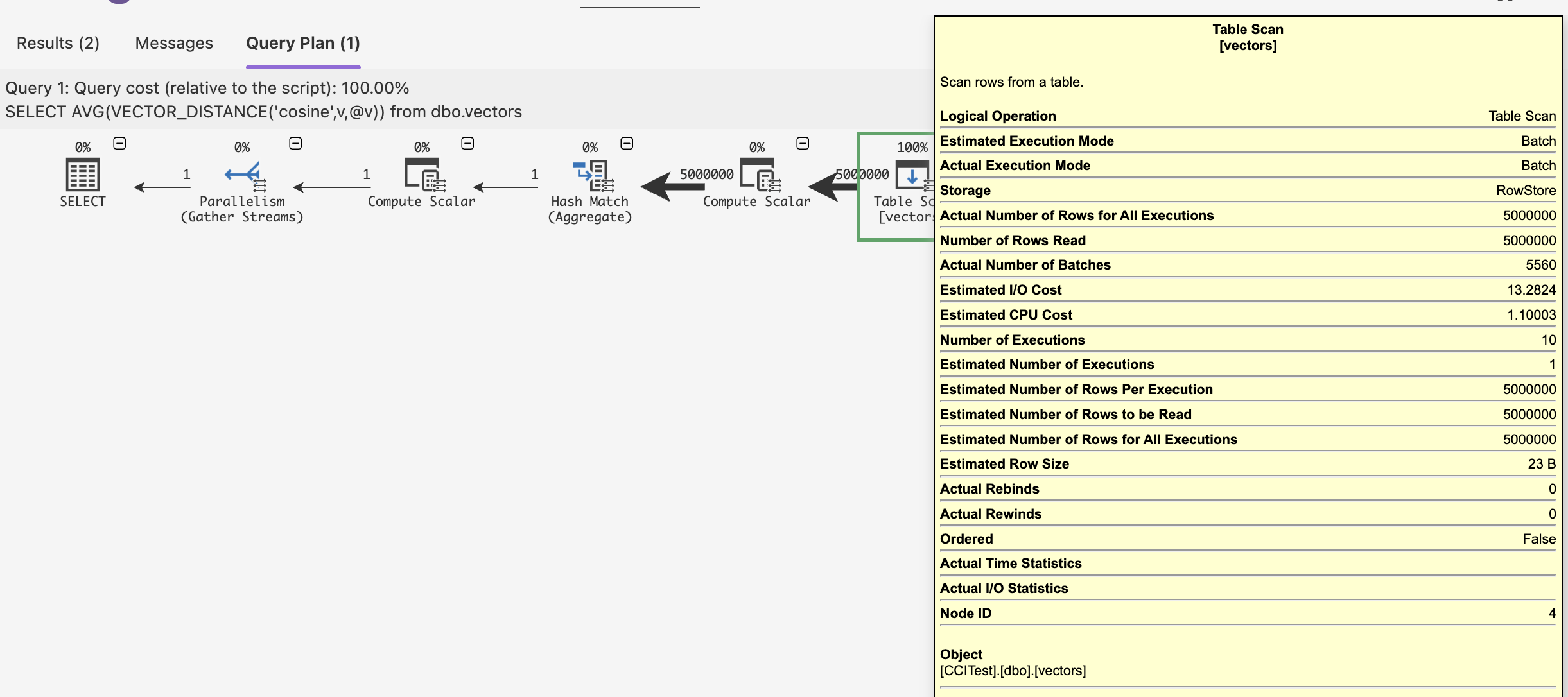
As you can see from the picture above – we do have a table scan and without presence of any Columnstore Index (no Batch Mode injection here), we do have a Batch Execution Mode ruling the query processing. I can almost declare myself happy. :)
Why did I write – ALMOST ?
Well, in reality, my very first test of the Columnstore Index was calculating the average against the [id] column, with an already existing Clustered Columnstore Index:
CREATE CLUSTERED COLUMNSTORE INDEX CCI_vectors on dbo.vectors;

SELECT avg(id)
    from dbo.vectors;
which … resulted … in the following error message:
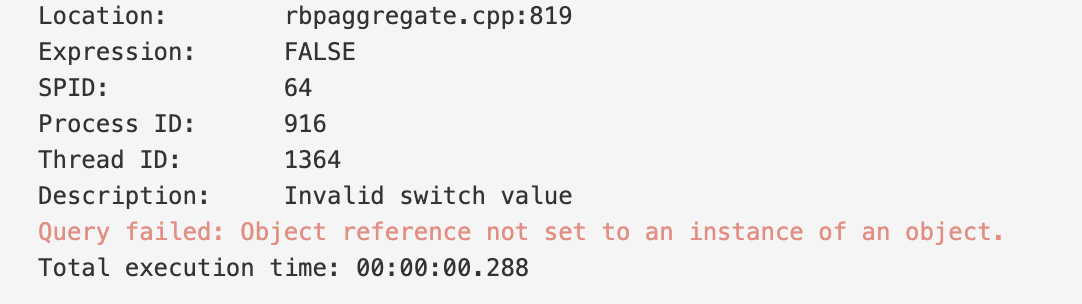
I have played a bit with the problem and it seems to me that the underlying problem is in the way the overflow is handled … There are 2 ways to prove it:
1. Remove the CCI and enjoy the overflow error message
2. Run the following modified query (yes, I used Float as a kind of a pun):
SELECT avg(cast(id*1. as Float))
    from dbo.vectors
And the above query works quite fine.
Overall, it seems like a simple overflow bug that was not handled. You know when “Preview” features should be enabled on RTM releases of the product…
Vector Index and Batch Mode
One more question that I have raised when started testing the Vector funcitonality in SQL Server 2025 was, will Batch Execution Mode work with the Vector Index? Knowing by now that Columnstore Indexes are not compatible at all with Vector Index, the only possibility was to test whether Batch Execution Mode on Rowstore can be triggered against the Vector Index.
I will not sugarcoat you about the performance of the Vector Index creation procedure – it is painfully slow. There have been a number of blog posts and videos on the performance of the Vector index creation and how some improvements in RTM helped it to be more in line with the general expectations, but this feature is very well specified as a “Preview” one and those 1 million rows will require a lot of processing time to finalize the setup:
CREATE TABLE dbo.Articles
(
    id INT NOT NULL PRIMARY KEY,
    title NVARCHAR(100),
    content NVARCHAR(MAX),
    embedding VECTOR(5) -- mocked embeddings
);

-- Insert sample data
INSERT INTO dbo.Articles ( id, title, content, embedding)
SELECT TOP (1000000)
    ROW_NUMBER() OVER (ORDER BY (SELECT NULL)),
    'Advanced AI', 'Exploring advanced AI techniques.', CAST(
            JSON_ARRAY(ABS(CHECKSUM(NEWID())) % 1000,ABS(CHECKSUM(NEWID())) % 1000,ABS(CHECKSUM(NEWID())) % 1000,ABS(CHECKSUM(NEWID())) % 1000,ABS(CHECKSUM(NEWID())) % 1000) as Vector(5))
FROM sys.all_objects a
CROSS JOIN sys.all_objects b;

-- SCreate a vector index on the embedding column
CREATE VECTOR INDEX vec_idx ON Articles(embedding)
WITH (metric = 'cosine', type = 'diskann');
Warning: On my tiny Docker instance it took just 18 minutes to create the Vector Index.
Now to the query – let’s perform a rather primitive aggregation (COUNT) over a vector similarity search.
-- Perform an aggregation over a vector similarity search
DECLARE @qv VECTOR(5) = '[0.5, 0.4, 0.6, 0.1, 0.2]';
SELECT
    COUNT(*)
FROM
    VECTOR_SEARCH(
        table = Articles AS t,
        column = embedding,
        similar_to = @qv,
        metric = 'cosine',
        top_n = 100000
    ) AS s
If you look into the execution plan, you will find that it uses Vector Index Seek and Stream Aggregate iterators to execute the tasks of seeking and aggregating information, even though the whole enterprise is running in a single-threaded fashion, even with the FULL optimization level being applied to the query. The total cost of the execution tree is 0.154912 – which is well below any value that can enable a parallel query. The Inner Loop is also a strong indication that it won’t be easy to get a Batch Mode working on the plan (unless the query itself is a monster and posterior aggregation eventually produce a huge plan).
This all together makes the result to perform rather slow on my test docker instance – with over 3 seconds of the runtime.
Any query that I have made in the limited time that I have spent with the Vector Indexes were only able to land the Row Execution Mode, without any chances of significant processing accelerations. I am not surprised that the current “Preview” state of the technology does not include the Batch Execution Mode, but I am expecting that to change in the future.
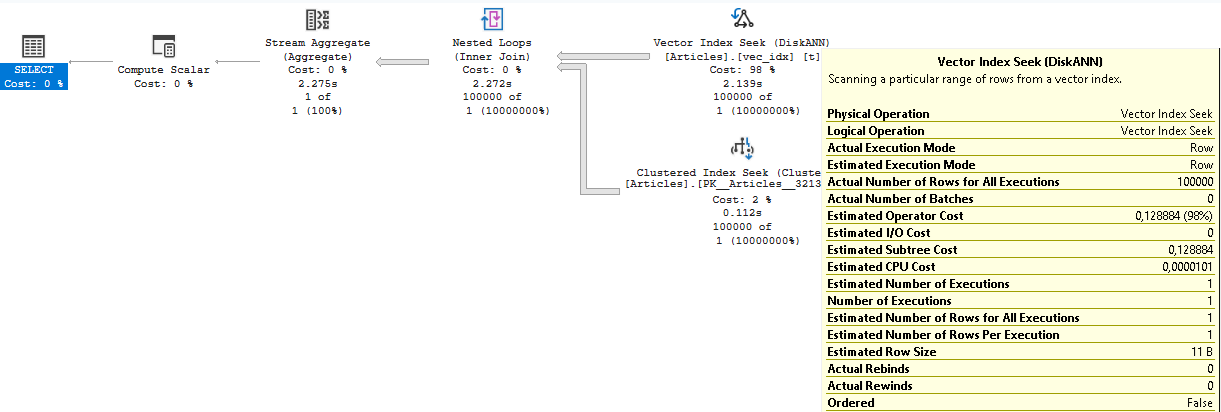
From different tests that I have executed by using direct queries against the column and the usage of the VECTOR_DISTANCE function, the queries has always resulted in a Clustered Index Scan rather then attempting to use the Vector Index (Yeah, none of those queries were using a similarity search).
And even though the schema for SQL Server 2022 was published right away in November 2022, right now in the late December 0f 2025, there is still no schema for the SQL Server 2025.
https://schemas.microsoft.com/sqlserver/2004/07/showplan/
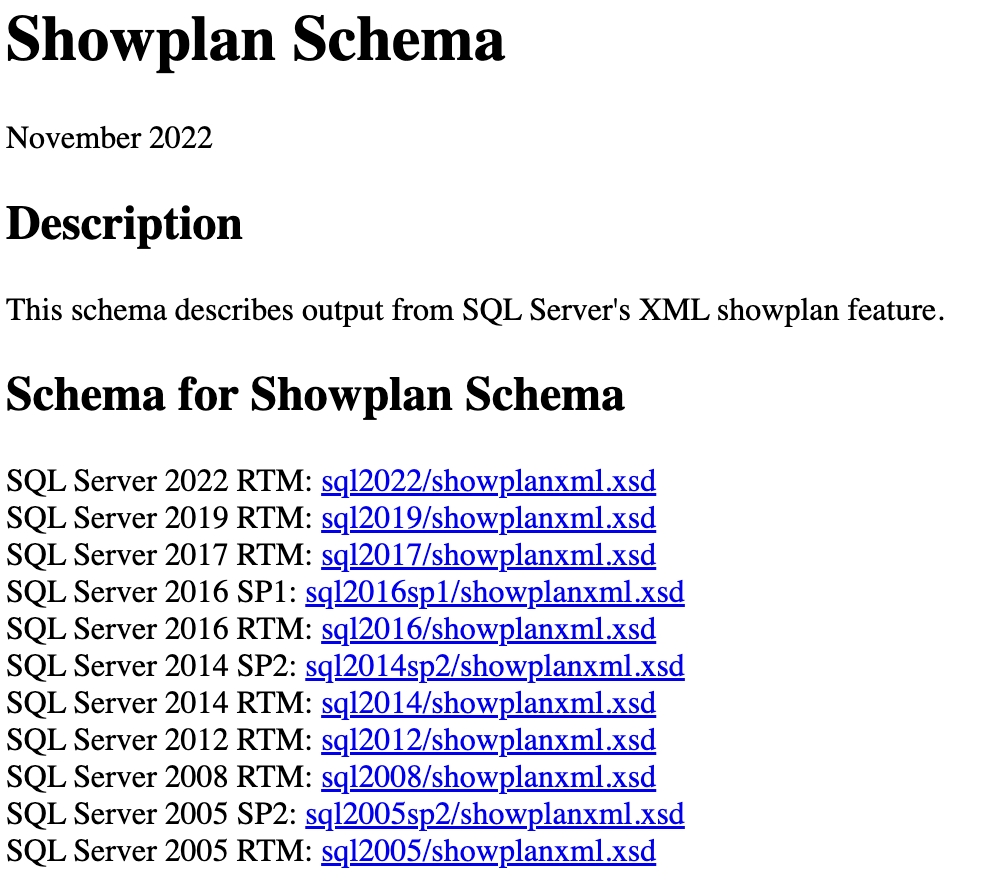
This might be a good thing, as SQL Server 2025 is obviously getting improvements to all those “Preview” features and those features might bring a schema changes.
Final thoughts
It feels a kind of weird even to write these “Final thoughts” about an extremely early state of the Vector Indexing technology interconnection with Columnstore Indexes and Batch Execution Mode, but I will attempt to take a first stab.
I am glad to see the possibility of running Clustered Columnstore and Nonclustered Columnstore indexes alongside the Vector datatype. Having the Batch Execution Mode working both on the Columnstore Indexes and on the Rowstore Indexes is great news.
Having In-Memory Columnstore Indexes not being supported is an understandable situation, especially for the initial “Preview” state.
The lack of the Batch Execution Mode support for the Vector Indexes is something that I think we might see changing in the future (in a different SQL Server version, obviously), and I think that for the Vector Index feature to be truly competitive with other engines, it will be needed. In the real life, nobody is using those small tables with 5 rows that are used to demo the technology.
The evolution of the Vector Index – supporting DML operations, compatibility with Columnstore Indexes and relaxing of the initial limitations are the things that I will be looking forward to.
TLDR: the outcome of the SQL Server 2025 RTM for Vectors & Columnstore & Batch Mode looks the following way:
| Feature | Clustered Columnstore | Nonclustered Columnstore | In-Memory Columnstore | Ordered (CCI & NCCI) | Batch Mode on Columnstore | Batch on Rowstore |
|---|---|---|---|---|---|---|
| Vector_datatype | yes | yes | – | – | yes | yes |
| Vector_Index | – | – | – | – | – | – |
to be continued with Columnstore Indexes – part 135 (“JSON type and JSON Index with Columnstore Indexes”)