Continuation from the previous 132 parts, the whole series can be found at https://www.nikoport.com/columnstore/.
In the Columnstore Indexes space, there is a long-standing “tradition” in Microsoft to ignore the needs of the customers for data replication. It has started with with the original SQL Server 2012 release not supporting any data manipulation operations besides Partition switching. Since then it has been improved from version to version up until SQL Server 2016 where Nonclustered Columnstore Indexes has received a support for the Transactional Replication, and voila – that’s where it has stopped!
I have blogged about the situation in Columnstore Indexes – part 83 (“Columnstore Replication in SQL Server 2016”) and Columnstore Indexes – part 120 (“Merge Replication 2016-2017”) that Clustered Columnstore Indexes since their original release in SQL Server 2014 has never gotten any love for data replication processes.
Side note: In the modern context of the SQL Server 2025, it is funny to look at the production preview-Vector indexes through the POTENTIAL prism of the where it can develop in the future.
Almost 12 years later – we are still at the same location, there was no progress.
I know a few people in Microsoft engineering that do love data replication area (Looking at you, PK, if by some random chance you are reading this :)), but they are not in the control, unfortunately.
The lack of the core features for replicating Data Warehouse workloads speaks for itself. The path of exporting data into Data Lake is possible with CTAS in SQL Server 2022, but the majority of the market you are running lower SQL Server version, and this path requires additional work and additional costs. Azure SQL Manage Instance Link allows you to replicate to Azure SQL MI only and contrary to any of the below listed methods, would require to replicate everything within the same database.
With that all being said, I want to go through the list of the Data Replication features (old and new) and show their status of integration with the Clustered Columnstore Indexes.
Replication
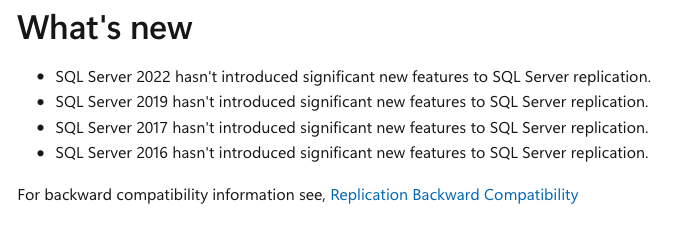 Under Replication in SQL Server I am considering Transactional Replication and Merge Replication. As mentioned in 2016 and 2018 posts:
– Columnstore Indexes – part 83 (“Columnstore Replication in SQL Server 2016”) Transactional Replication supports Nonclustered Columnstore Indexes.
– Columnstore Indexes – part 120 (“Merge Replication 2016-2017”) Merge Replication does not support Columnstore Indexes.
It appears to be that, Transactional Replication simply uses the underlying structure of the table (Heap or Clustered Index) and ignores Nonclustered Columnstore Index.
As I written before – Customers running Data Warehouse or have an OLTP/OLAP solution with a massive table with a Clustered Columnstore – are out of luck. This is one of the lower-hanging fruits, engineering-wise, but it seems never getting enough priority.
If you think I am trolling, take a look at the picture above with the list of the news from the previous releases of SQL Server, taken directly from the official documentation page for the Replication. Yes, this is almost a month after SQL Server 2025 has been released, and of course, there is not even a mention of it there.
This tells you the story, isn’t it ?
CDC (Change Data Capture)
Change Data Capture supports only Nonclustered Columnstore Indexes (2016+), through (drumroll) supporting the underlying Rowstore structure. Just like in the case of Transactional Replication.
Here is an example tested on SQL Server 2025 RTM:
CREATE TABLE dbo.t_colstore (

    c1 int NOT NULL,

    c2 INT NOT NULL,

    c3 char(40) NOT NULL,

    c4 char(800) NOT NULL,

    CONSTRAINT PK_t_colstore PRIMARY KEY NONCLUSTERED (c1)

);
-- Creates Clustered Columnstore Index
CREATE CLUSTERED COLUMNSTORE INDEX t_colstore_cci ON dbo.t_colstore;
Let’s enable the CDC on our current test database;
exec sys.sp_cdc_enable_db;
Now, we can enable CDC on our t_colstore table:
    EXEC sys.sp_cdc_enable_table

	@source_schema = N'dbo',

	@source_name   = N't_colstore',

	@role_name     = NULL,

	@filegroup_name = N'PRIMARY',

	@supports_net_changes = 1,

	@index_name = 'PK_t_colstore';
This results in the following error message:
Msg 35353, Level 16, State 1, Procedure sys.sp_cdc_enable_table_internal, Line 319

Change Data Capture cannot be enabled on a table with a clustered columnstore index.  Consider dropping clustered columnstore index 't_colstore_cci' on table 't_colstore'.
With Microsoft updating CDC for the Azure SQL Database, I have had some hopes for the improvements for Columnstore Indexes, but besides more limitations, such as disabling of the Online Operations, no aggressive truncation in ADR, default constraints values on added columns, etc – there was nothing significant to report for Columnstore Indexes. Do not take me wrong, I love that CDC was added for the Azure SQL Database, that was a really impactful step for the customers, but ignoring Columnstore Indexes is not a good step forward.
CT (Change Tracking)
Change Tracking is an awesome feature providing a lightweight way of tracking data changes within a table. Similar to CDC, it has added support (or simply not failed) Nonclustered Columnstore Indexes, but has done nothing for the Clustered Columnstore Indexes.
Here is an example of the code executed against SQL Server 2025 RTM:
-- Enable Change Tracking on the datatabase

ALTER DATABASE CCITest

SET change_tracking = ON  (CHANGE_RETENTION = 10 DAYS, AUTO_CLEANUP = ON);
The above statement works fine, with Columnstore Indexes not preventing us activating Change Tracking on the database.
Enabling it on the table with a Clustered Columnstore Index fails:
ALTER TABLE dbo.t_colstore

ENABLE CHANGE_TRACKING

WITH (TRACK_COLUMNS_UPDATED = ON);
with the following error message:
Msg 35353, Level 16, State 1, Line 1

Change Tracking cannot be enabled on a table with a clustered columnstore index.  Consider dropping clustered columnstore index 't_colstore_cci' on table 't_colstore'.
Fabric Mirroring
Regarding Fabric Mirroring on SQL Server 2025 … Clustered Columnstore Indexes are not supported, as per official documentation.
On Fabric SQL Database right now, one needs to create Clustered Columnstore Index right with the table creation, and that it is disappointing. It is still resolvable, by stopping and restarting the mirroring process, but the feature is in the preview and I will trust it once it is in GA.
I do believe that Fabric Mirroring CAN improve, but as in the case with many hurried features – I will happily wait to see it being complete before committing to it.
CES (Change Event Streaming)
I do not buy the “preview” excuse, Columnstore Indexes support needs to be there. I love the direction of the feature and even though I consider that event streaming has landed like 6 years late (should have been in SQL Server 2019) to be truly impactful for the platform.
Let’s do the basic test of the feature, even though the documentation lists that Clustered Columnstore indexes are not supported.
-- Create the Master Key with a password.

CREATE MASTER KEY ENCRYPTION BY PASSWORD = 'Grb234-.ds4o4ª`#';
CREATE DATABASE SCOPED CREDENTIAL ColumnstoreCred
WITH IDENTITY = 'SHARED ACCESS SIGNATURE',
SECRET = 'ThisIsNikoportNotARandomToken' -- Be sure to copy the entire token. The SAS token starts with "SharedAccessSignature sr="
-- Let's enable the CES
EXEC sys.sp_enable_event_stream;
EXEC sys.sp_create_event_stream_group
@stream_group_name = N'CESColumnstore',
@destination_type = N'AzureEventHubsAmqp',
@destination_location = N'myEventHubsNamespace.servicebus.windows.net:9093/myEventHubsInstance',
@destination_credential = ColumnstoreCred,
@max_message_size_kb = 128,
@partition_key_scheme = N'Table'
EXEC sys.sp_add_object_to_event_stream_group
N'CESColumnstore',
N'dbo.t_colstore'
The worst part right now for the SQL Server 2025 RTM is that all of the code runs without any error message. I am not including the complete testing of the Change Event Streaming as part of this research, but I will trust the public-facing documentation.
Note that looking even into the feed table brings a noob like me any clarity, and the DMV dm_change_feed_errors brings me a single message “Could not load external library ‘%s
EXEC sp_help_change_feed_table @source_schema = 'dbo', @source_name = 't_colstore';
SELECT *
FROM sys.dm_change_feed_errors
ORDER BY entry_time DESC;
Well, I actually know what the problem is – but it is outside of the scope of this Columnstore Index post to fix every feature problem. This situation hopefully will be addressed in one of the upcoming CUs.
Final Thoughts
Customers need possibility to move their data. This does not apply to OLTP scenarios but to HTAP and OLAP as well. Introducing a Columnstore Indexes 13 years ago in the product and not supporting the freedom of data movement is wrong.
Data Warehouse customers using Clustered Columnstore Indexes should not be decompressing their data, loosing their performance in order to replicate the data.
Is there a particular data replication method that I am rooting for ?
Yes, the one that will impact the majority of the customers. I do not particularly care if Microsoft fixes Replication or solves CDC or CT, but I rather want a solution that will provide a path to solve the problem.
to be continued with Columnstore Indexes – part 134 (“Vectors and Columnstore Indexes”)